EZCap movement assessments
EZTUG: Timed-up-and-go test
Upload your test. EZTUG tracks your movement and estimates the six phases automatically — no phase-by-phase data entry.
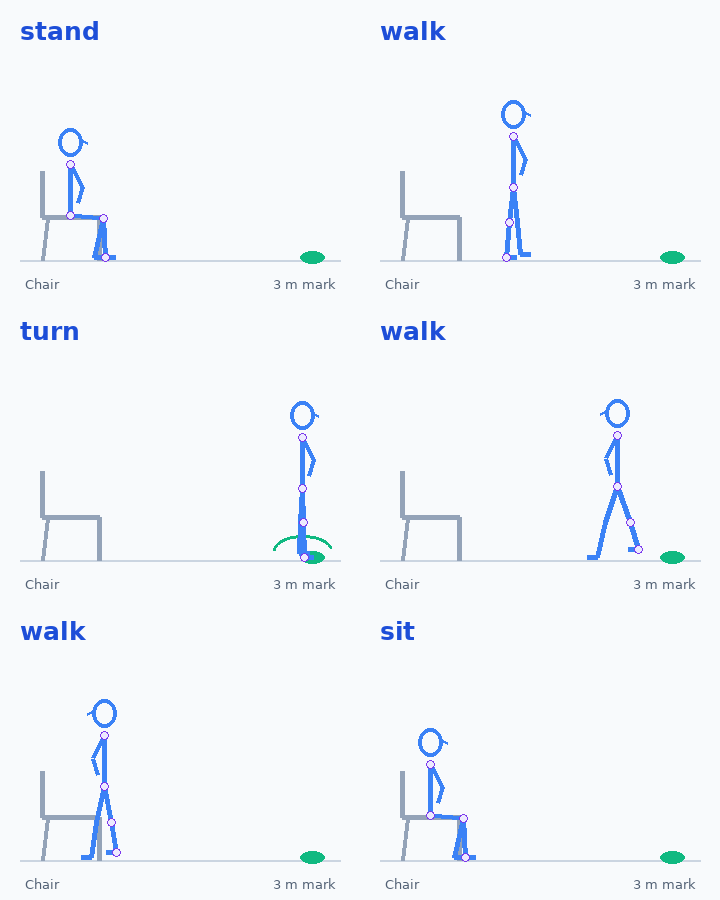
Start seated → stand → walk 3 m → turn → return → sit.
Test setup and safety
- Use a stable armchair (seat about 43-46 cm high). Mark a turning point 3 metres from the chair. Wear your usual shoes and use your usual walking aid; record these details below.
- Film the entire route with a fixed camera, full body and feet visible. Use a side-on view at the chair if you want trunk-lean estimates.
- Start seated with your back against the chair. Record one second at rest. Stand, walk at your usual safe pace to the mark, turn 180 degrees, walk back, turn to the chair and sit down. Stay seated for one second.
- Use a fixed side or oblique view showing lateral travel. Include one second seated at each end. Automatic timing starts at movement onset, not the spoken instruction; instruction-timed clinical cut-offs do not apply directly.
Stay safe. Have someone nearby. Stop for pain, dizziness, breathlessness or unsteadiness. Do not attempt this alone if you need assistance. This research tool does not diagnose Parkinson's disease or predict falls.
Your assessment
Choose a full TUG video, then select Analyse TUG. Processing stays in your browser.
Recording options
Automatic phase and foot-event estimates are experimental, not clinically validated. Metric lengths, angular velocity and double support are unavailable without suitable calibration or contact observations.
My MP4 will not play or analyse
MP4 is a container, not a video codec. Browser support depends on the codec, device and operating system. If playback fails, re-export the original using H.264 (AVC), 8-bit video, MP4 container (for example with HandBrake: MP4 format, H.264/x264 encoder, not H.265/HEVC). Renaming a file to .mp4 does not convert it. A damaged or incomplete file may need to be exported again from the original recording.
If you use FFmpeg locally, write to a new file to preserve your original:
ffmpeg -i input.mp4 -c:v libx264 -pix_fmt yuv420p -an -movflags +faststart tug-compatible.mp4This removes audio; EZTUG uses movement onset and does not need the spoken instruction.
Position the whole route in view. Start seated, then wait one second before moving.
Use the detected phase cards in your results to jump to each phase. Step controls move 1/30 s, not guaranteed frame-accurate for variable-rate video.
AI notice and skeleton replay
Optional timing corrections and calibrated measurements
Automatic analysis does not require these fields. Use them only to correct the detected phases or add verified measurements the video cannot supply.
Your results
Movement estimates, not a diagnosis or fall-risk score. Chair transfers use EZRise metric definitions, not its five-repetition score.
Why measure turning? Turning performance can be sensitive to fall risk and movement difficulties in Parkinson's disease. Slower turns, more turning steps or altered angular velocity warrant clinical interpretation; these metrics alone do not diagnose disease or determine an individual's fall risk.
EZTUG · Personal movement report
Your personal report is ready
Keep your results. Take them to your next appointment.